Monday, 13 August 2012

(Dis)assembly

There's been some good news and some bad news: the bad is that I have not had and will continue not to have enough time to work alone on the oktokopter project, and the good is that a team of robotics students and engineers at Arizona State University have volunteered to continue the work. We are shipping the 'kopter overseas, disassembled so as to pack well for the trip. To help the ASU team (and anyone in future working on this project!) here's an overview of how to put the 'kopter back together.

Remove the propellers: use an 8mm hexagonal spanner to undo the self-locking nuts. There is a black washer between each nut and propeller.


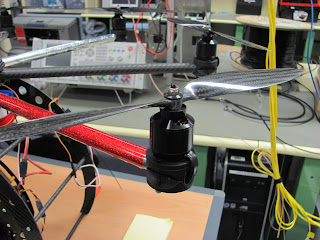
Note that the propellers are on in alternating clockwise and clockwise configurations: the red (port) spar  is shown below with the correct propeller so you can put them back on correctly. If you get them all wrong, the copter won't take off, but push itself into the ground!


After removing the clear plastic hood and putting the cottle pins somewhere safe, undo all of the black bolts with an allen key or ball screw, holding on to the 3.5mm nut at the bottom each time with either your fingers or a small spanner. (These bolts hold the strut saddles in place around the frame.) Put the black bolts and nuts together in once place.

Undo the silver bolts: these not only hold half of a strut saddle each, but also hold the platform onto the landing gear frame. As such they are slightly longer than the black bolts.
This is a view of the connection between the platform at the landing gear, before disassembly. Note that the platform touches the clear plastic frame directly, and then the load is distributed with a carbon fibre insert. This falls out when the silver bolts are removed.
After the platform is removed, the struts can be rotated around so that the starboard and port struts join the  front struts, and the remaining struts fold back with the rear struts.
All the cables connecting the landing gear to the platform have to be disconnected so here is a photo record of the connections:

We have since extended the camera mount lead since the
one that came with the 'kopter was not long enough.


Tuesday, 6 March 2012

Vario Height Control

On the last flight I had the throttle set at just over the neutral position, which led to the 'copter making an ascent to 50m instead of performing its waypoints at 15m. I wanted to double-check that I fully understand the altitude controls so I thought I'd write down a bit of research.

There are three kinds of altitude control settings for the MK: manual, Height Limitation Control , and Vario Altitude Control.  From the 0.84 Firmware documentation, I find that the altitude control for waypoints "works only in vario-mode of the hight control. The gas-stick must be in the hoovering hovering position in that case." So comparing our two main modes:

With Vario OFF (manual mode ON):

  • throttle neutral -> propeller speed is at some level -> 'copter may ascend or descend depending on relative power of propellers against the air
  • throttle up -> propeller speed increases -> 'copter ascends
  • throttle down -> propeller speed decreases -> 'copter descends

with Vario ON (manual mode OFF)

  • throttle neutral -> 'copter remains at the height it is at
  • throttle up -> 'copter told to go higher -> it increases its own propeller speeds and ascends
  • throttle down -> 'copter told to go lower -> it decreases its own propeller speeds and descends

When switching between Vario mode ON and OFF, it's best to have the throttle at neutral. Otherwise it can gain or lose altitude unexpectedly. I found a video with a little demo on a quadkopter.

According to the 0.86 Firmware documentation, I can get more info from the HOTT transmitter screen:

Vario - symbol
This shows the setpoint of the altitude control. (vario mode only)
= : no change in altitude
+ : increase altitude
- : decrease altitude
^ : increase (command from NC: (Waypoint))
v : decrease (command from NC: (Waypoint))
The background of the symbol is black, if the altitude control is activated.

I've tried to find the relevant screens on the transmitter with the 'copter switched on and calibrated, but not flying, and so far I can't find anything like the screens described. So on another still day, I should take it up a bit, put it in PH/AH and see if I can find the telemetry data described.

Thursday, 1 March 2012

Waypoint Tests

The plan today was to test two things: altitude control and curved vs. straight flight paths. I planned four sets of waypoints:

  • Vertical ascent at point A in steps of 5m, with 5s delays in between each waypoint, up to a height of 20m
  • Vertical ascent at point A in steps of 5m, with no delays, up to a height of 20m
  • Curved flight from B to C, pointing at POI
  • Straight flyover from B to C, pointing at POI

The temperature was 30C and the wind was moderate and steady: 16 knots, SE. It was mostly sunny.


Flight 1 - Vertical ascent with delays @ A

Start 14:47:48
I started the 'copter a little south of location B, while I stood slightly further to the south. I performed the pre-flight checks, started the motors and sent it up a few meters, then engaged waypoint mode. As it moved to point A, I also moved to the 'me' location. It ascended in altitude steps but seemed to take a long time to do each step. Brought it down nicely.
End 14:49:53

I decided not to perform the vertical ascent without delays until I could ascertain whether the first programmed flight corresponded well to the measured flight, from the logs.

Flight 2 - Curved flight path B -> C
Start 14:59:34
I was at the 'me' location and the 'copter was at point A. I performed the pre-flight checks, started the motors and sent it up a few meters, then engaged waypoint mode. It moved smoothly to B, but the next waypoint steps were not smooth, and it took a long time to move over the flight path, even with no delays set. Not as bad as with 7 propellers but still need to come up with better Radius/PID settings. I aborted the flight about 20m East of point B and brought it down safely.
End 15:02:35


Flight 3 - Straight flyover B->C
Start 15:09:03
I was at the 'me' location and the 'copter was at point A. I performed the pre-flight checks, started the motors and sent it up a few meters, then engaged waypoint mode. It moved smoothly to B, but kept ascending once it was there, up to an estimated height of 50 meters. I realised I had the throttle at 55% instead of 50% so it just went up-and-up, until I realised, reduced the throttle, and brought it down. It was supposed to fly over at 15m altitude, but it did not begin its waypoint until about 5m. As it was so close to the ground, I set it to PH/AH and brought it down instead.  I need to check logs to find out how high it thought it was when it started to execute the waypoint.
End 15:10:55

Results
The first interesting result is that the 'copter does not appear to log until waypoint mode is engaged. Thus some flight logs, such as the first flight, do not have data points until 9m altitude, the point at which I engaged the waypoint mode.

Flight 1
It's hard to measure the time spent at each altitude as the 'copter doesn't seem to be able to stay exactly at the right altitude. It also didn't reach 30m. It's possible that because I have 'radius' set to 10m, the 'copter thinks that when I tell it to climb to 15m or 20m, and it is already at 10m, it thinks it is close enough, and doesn't bother to climb until the 25m waypoint kicks in. Then it ascends to 25m, reads the 30m waypoint, but thinks it's close enough, so just hovers for 15 seconds. For some reason it then descends to 20m and pauses there. So 5m increments may simply be too fine for the 'copter to manage.

One might also guess from the birds-eye projection of this flight that the x,y position r.m.s. is around 8m. But taking the standard deviation of the logged latitudes and longitudes shows that the r.m.s. is more like 2.3m, which is a good measurement to have made. This would be excellent to measure again on a cool, still day.

I also made a histogram of the position offsets in latitude and longitude. The average of the longitude position offsets was 0.3m (east) and the average of the latitude position offsets was 1.4m (north). This suggests that the wind was probably blowing more from the south at altitude, pushing the 'copter slightly to the north.

Flight 2
Looking at the flight log, the 'copter took about 25 seconds to 'find' a waypoint to sufficient accuracy, which was usually between 5-10m away from the right position. The strong breeze no doubt made it more difficult - it would be informative to run the same test on a very still day. It may also be useful to set the allowable 'Radius' to 20m, to see if the 'copter spends less time trying to get to the waypoint, even if it doesn't get the waypoint exactly right.

Flight 3
There is a "TargetDistance" column in the GPX file, which I think refers to the distance away from the next waypoint. From the previous flights I couldn't tell if it took into account altitude, but from this flightlog, one can see the TargetDistance staying low, even as the altitude significantly deviates from the expected waypoint. This is another argument in favour of performing straight flyovers, since if we keep the elevation steady, then we correctly log how far away the next target is.

The point at which the TargetDistance suddenly increases is when the 'copter reaches the radius of Waypoint B, and then decides it needs to move to Waypoint C. This is at just 8m altitude, and the 'copter was still descending, and when the 'copter does a course-correction it usually does drop slightly as it changes power in its motors. The elevation it was supposed to use was 15m, but 8m is only 7m less than this, and the allowed radius was 10m, so actually this scary-looking behaviour was fairly reasonable.

In terms of getting more reliable altitude behaviour, I need to read up the documentation, and get a bit better at judging heights rather than relying entirely on autopilot. The 'copter tripled its height before I decided to bring it down again; it should have been clear after 20 seconds that something was wrong. It's also probably a good idea to test the straight flyover at a higher altitude than 15m if I continue to use a radius of 10m for the waypoints, since that gives us only a minimum of 5m clearance above the ground. 20-30m would be safer, and more similar to actual field conditions of 100m.

Overall
I thought from a previous comparison of the logs that the KML files contain a log every second, and that the GPX files contain a log every 2.5 seconds. However I found this time that there was some jitter around these numbers. I can't tell which one is 'off' because the GPX files only contain the time to the nearest second, and the KML files have no time logged at all. It's hard to get sub-second accuracy using any other equipment such as a stopwatch, due to human reaction time. What might be a good idea is to set the KML logging to say, 10 seconds, and the GPX logging to 1 second, and see if I get a good GPX log every second.

Overall, the camera tilt seemed too high - the servo adjustments I made appear to have gone too far. I need to set up a waypoint on the ground, and go to several different altitudes at the same point, and see if the camera still points in the correct direction. If not, I should adjust the servo settings again. It might be possible to do this in the lab just by picking it up and tilting it - something to hold it in place would be useful.

One thing that would make flight set-up easier would be to have some device to find out where the POI is. The car GPS was too low-accuracy. Maybe I should simply have a first-flight program which simply flies to the POI to be used for the rest of the flights.


Further Flights
  • On a still day:
    • Measure r.m.s. position accuracy by hovering or moving between vertical waypoints;
    • Run the curved flight path with lower and higher radii;
  • On any day:
    • Mess with the altitude controls and see if I can get 5m precision;
    • Get the servo mount settings correct by ascending to a series of known altitudes and check the pointing via a video camera;
    • Run the straight flyover with waypoints at at least a height of (Radius + 10) m to allow for the 'copter's uncertainty in altitude;
    • Change the logging settings:
      • Reduce the KML to intermittent and see if GPX logging is more frequent;
      • Reduce both to prime intervals (e.g. 3, 5) so that they don't overlap frequently and see if they are more consistent.

Thursday, 2 February 2012

Heading and Altitude Test

Plan
The plan today was to test a series of waypoints with different headings. I hoped to program the 'copter to fly between two points, pointing in a different direction each time. This would help with aerial photography, as I could then choose where I want to point the camera. It would also give me a feel for how accurate the compass is, if I pick cardinal points with clear landmarks.


Flight Log

I carried out two separate flights, both attempting to execute the above plan. Weather was perfectly still, 100% humidity, and about 30C.

Flight start: 11.46am
I accidentally had 'home' engaged during take-off. I flipped back to 'manual', and then to 'home' again, hoping to execute the waypoints. The 'copter flew to its first waypoint but hovered there without moving. Later, in the video, I found that it was pointing at the POI, rather than North, as I expected. I had programmed in a heading of '00' but apparently this causes it to use the POI rather than point at zero degrees - useful to know!

I set the 'copter back to PH/AH and flew it back to the point at which I had taken off. While moving it back, I found that Carefree mode made it actually more difficult to control. Perhaps I had moved from my starting point, or because it had moved to a 90degree angle to my starting point, the controls were not quite as I expected. In any case, I returned it to full manual mode, brought it back over the landing point and landed it very safely and gently,
Flight end: 11.48am

Flight start: 11.53am
The next flight, I was determined to execute the waypoint pattern and perhaps was not as thorough with my pre-flight check as I should have been. This time, I correctly set the switches on the controller ('manual', 'carefree on'), but I forgot to check the tightness of the nuts on the propellors. I also did not review the video of the last attempt, assuming that the reason it did not execute further waypoints was my mistake in starting with waypoint mode already on, but I should have realised that in that case it would have returned to the landing point, as that was the last waypoint on the list.

I calibrated, started the engines, and smoothly took off, then engaged waypoint mode again. The 'copter flew to its first waypoint but again hovered for a good twenty seconds without moving on to the next waypoint. I realised that this might be something to do with the altitude settings - that it would like to be at 50m, but that it could not get there, because the climb rate was too slow. (I had seen complaints of this on various forums). At this stage, I probably should have landed it and reprogrammed it with lower-altitude waypoints, but I was wary of being too close to the trees. Instead, I increased throttle to move it to 50m. It then moved to the next waypoint, but again hovered for ~ten seconds or so without moving, rather than the expected five. I assumed I was again too low, and increased altitude, but the 'copter did not execute the next waypoint. I realised in retrospect that I had probably gone too high, and again it was waiting to get to 50m before it could execute the next waypoint.

I decided at this point to abort the flight and return it to the secondary landing spot on the west end of the courtyard. I engaged PH/AH, reduced throttle, yawed around clockwise 360 to check responsivity, and began to bring the 'copter back toward the courtyard. At this point, one of the propellors flew loose, and the 'copter began to fly erratically. With PH/AH engaged, the 'copter was attempting to engage the motors in a way that it thought would keep it at constant altitude, but missing a motor, it began to descend, and also slew. For thirty seconds or so I fought this behaviour, until I realised what the problem was, and switched it to full manual mode. I then yawed it so that its back end was facing me again, and brought it back to the courtyard, and landed it again. However I was rather anxious at this point (I had nearly lost it!) and the landing was not perfect, so one of the stressed carbon struts finally broke loose.
Flight end: 11.58am

Lessons

  • I didn't manage to thoroughly test the functionality I wanted to test - i.e. pointing in different cardinal directions while moving - because the very first heading I used, 00, caused the kopter to point at POI. I will try 360 next time, and perhaps 01.
  • Altitude control is tough, and if the 'copter needs to be within a certain altitude in order to execute the next waypoint, then it's crucial to either
    • get better at using the MX-20 transmitter display so I can read and adjust the altitude quickly
    • use a lower altitude so I can more easily see whether it is too high or too low - at previously tested altitudes of 10--30m I had none of these problems
    • figure out how to get the 'copter to completely control its own altitude - in the firmware documentation there is a good discussion of this
  • Slewing clockwise may be a particularly bad idea and cause propellers to come loose - always slew anticlockwise.
  • A pre-flight-check needs to be designed and more carefully attended to.
  • Bring lots of spares - and investigate the issue with the struts.

Wednesday, 1 February 2012

50m Flight Test

Plan
In anticipation of the site visit to MRO, which may involve aerial photography of the Australian SKA Pathfinder dishes, I wanted to get a feel for flying at a higher altitude than I had tried before. Since it's better to do this in baby steps, I set a course for half of the legal altitude - a couple of way points at 50m. To try not to change anything from previous waypointed runs, I generated a rough rectangular flight path around the courtyard, focusing the camera on a POI about 10m west of where I was standing with the controller. I also hoped to compare the GPS log to the execute plan to see where the 'copter thought it was compared to where I told it to be.


Flight Log

I carried out two flights following the same waypoint pattern, because the video did not record the first time. Weather was fine, wind around 10 knots, NW.

Flight start: 14.41
Took off very smoothly, engaged Carefree, tested the controls, took it to altitude visually, and then engaged Waypoint mode. 'Copter yawed noticeably in order to focus on the POI, and then executed the waypoints. At one point, it flew along the same line-of-sight as the Sun, which made it difficult to see. Brought it down safely and found that the video hadn't recorded.
Flight end: 14.44

Flight start: 14.53
Again, smooth take-off, visually brought it to altitude, engaged Waypoint mode. The pattern executed was the same. Landing was again smooth and on target.
Flight end: 14.56

Struts are showing further signs of wear and one keeps coming loose no matter how gently I land!

Found on return to the lab that no GPS log had been made, as the microSD card claimed to be write-protected. I had previously used the same microSD card in the MX-20 transmitter so it's possible it had somehow corrupted the card. I eventually managed to reformat it in FAT(default) on Windows 7, and it seemed to read and write fine after that.

Lessons
  • Try not to program in a flight path that causes the 'copter to come within 5 degrees of the apparent Sun; any loss of control at that point would make the 'copter very difficult to recover.
  • Video camera switch needs to be firmly engaged in 'Record' mode.
  • MX-20 transmitter may be corrupting microSD card; be consistent with card in each device if I plan to log both.
  • 50m is really, really high.


Saturday, 14 January 2012

GPS Logging

Having enabled the POI functionality, I wanted to properly log the GPS co-ordinates of the 'copter. I had another demonstration to perform to another group of NYSF students, so I figured I would try to get logging working and see if I could record anything. I didn't have time to do much before the demo at 11, so I just quickly popped it up in the air for them and then back down again:
The flight was between 11.08 and 11.09 am WST in the courtyard, and it was just a tad windier than yesterday. Unfortunately the POI was still too far to the south, so I was again not directly pointing at the group of kids!

After this I researched a bit more about how to log the GPS. I found that the MX-20 transmitter can perform logging, but more of the telemetry, like temperatures, control stick settings etc. It also produces very large files which have to be opened using a proprietary program from Graupner. I tested it out and it wasn't very user-friendly, mostly in German and with many dialogues and help boxes empty or containing filler text. As it can only log what it is sent by the 'copter, I realised it probably wouldn't help us with the main effort, to accurately measure the 'copter's position, any more than just recording directly. In the interests of completeness though, here is how you set up some auto-logging that begins when your flight starts:
  • Go to 'control switches'
  • Move the throttle joystick
  • Set the threshold to just past off, e.g. -88%
  • Go to 'timers'
  • Set that control switch as starting the 'Flt' (flight) time
If there's a micro-SD card in the transmitter, this will start logging when you bring the throttle up after starting the engines. Unfortunately it currently won't stop until you turn the transmitter off.

To log on the 'copter, it's a lot easier - just put a micro-SD card in the Navi-Ctrl board. 2GB is more than enough space as it generates very small files. It creates both a GPX file and a KML file: The KML file has  simple entries like
+115.8894829,-32.0038644, 1.789
showing the longitude, latitude and altitude, and it logs these every second.

The GPX files show a lot more data: 34 different data objects like roll angle and heading, and more information on the 'copter status, like available motor power and the motor temperatures. These points are logged every 2.5 seconds.

Now that I had a way of logging the position of the 'copter, I wanted to try a flight path that resembled the a possible flight plan for the MWA tile measurement: a curved flight with varying altitude, so as to eliminate the effect of taking a straight cut through a spherical beam. I came up with a simple series of waypoints using a sin curve, since I didn't need to be exact, just test the functionality.


When we were in the field, I uploaded the POI as the first waypoint, as I wanted to fly the 'copter over to its exact start position and land it there. I left the POI in the file, a mistake!

Flight start 16:33
I started the 'copter in CF mode and took it to 10m, then engaged 'come home' to send it to the POI. It reached it, but then behaviour I had not accounted for kicked in. Hovering directly over the POI, the 'copter was straining to tilt the camera mount at the point directly beneath it, and was slewing around in a clockwise arc trying to get to an impossible angle. The landing gear was also disrupting the servos on the camera mount. I immediately put it in PH/AH and began to land it, but it was difficult as the 'copter continued to slew around. I had seen warnings about this on the forums, but I didn't realise that it would be so difficult to control. After a few clockwise turns it lost a propeller! I brought it down and we managed to find both the prop and the washer, but lost the nut holding the propeller on. I realised afterward that I should have turned off CF mode, as then the 'copter would not have been trying to point at the POI, since that functionality is then disabled.
Flight end 16:34

Flight start 16:53
Having lost one propeller, I still hoped to see if the curved waypoints would work, so we brought the 'copter back to around 10m east of WP2, and deleted WP1 from the log. I brought it up and started the waypoints, but the 'copter rose poorly and slewed around, spending a lot of time trying to get to each waypoint even though I had told it to spend zero seconds at each one. After a minute I brought it down again, as it was clear it was not going to be a good test of the functionality.
Flight end 16:34

I looked at the logs and they were difficult to understand at-a-glance. I tried putting them into Google Earth but it runs very slowly on my computer and GE's handling of altitude is terrible. Then I found this excellent little online app: http://www.gpsvisualizer.com/ which can produce a nice png of each flight, or transform it into files for use in other programs.
Clockwise spirals while hovering directly over POI.

Poorly-executed curved flight path - missing a propeller.
Lessons:
  • Never hover directly over a POI; the 'copter becomes extremely erratic as it tries to get the camera pointing directly at it. If you do accidentally end up doing this, turn off CF mode, turn on PH/AH and land immediately, then reprogram.
  • Flying manually is ok with seven propellers, and it can execute simple waypoints, but it can't make fine adjustments well enough to perform a densely-waypointed flight path.
  • The propellers have a tendency to come loose when you yaw clockwise - probably due to the unreversed threads on half of the motors.

Friday, 13 January 2012

Carefree and Point-of-Interest

After some research online, I found the issue that was preventing our 'copter from yawing to point and tilt the camera at a point-of-interest while executing waypoints. According to the mikrokopter website, Carefree mode must be enabled to use POI mode. This is a safety feature, because after you have finished executing a series of waypoints, it is tricky to see the orientation of the 'copter. In Carefree mode, the 'copter knows where you are when you started it up, and it works out the angle between you and it. It then assigns whichever direction lies away from you as its nose, so that if you tilt it right, it moves (apparently to you) right, left left, and so on. Thus if it is far away at the end of the execution, or something goes wrong in the meantime, you can simply tilt the control joystick toward you, and it will fly back toward you, without worrying about where its real 'nose' is pointing.

As it happened, I had a convenient moment to test this functionality, as a group of National Youth Science Forum students are visiting Curtin / ICRAR, and I've been asked to demonstrate the 'copter to them. They will be visiting the courtyard behind my building, so I had a quick look and saw a convenient grassy space they could sit in, while I used the larger area to fly.
I readied the transmitter and 'copter and programmed in the POI, -31.99447 lat, 115.88896 long. I pointed it toward the POI to start with, so that it was reversed controls compared to how one usually flies. I wasn't sure what would happen if I started with Carefree enabled, so I throttled up with it disabled. However I found the reversed controls so confusing that I immediately landed again, and decided to try with Carefree enabled from the start. I re-uploaded the POI, turned on the camera, and switched the CF switch on the transmitter to the 'on' position. This time the controls were not reversed, although it was very strange to be flying with all of the reflective lights and tape no longer relevant. I brought up the 'copter and took it a bit toward the crowd - who unfortunately were sitting in the shade, approximately where the green arrow is, rather than at the POI I expected! (show picture) After a minute or so of hovering, and gently moving it around, I took the 'copter back to its landing point, brought it down and took questions from the students. When we looked at the video, the POI tilt had worked well - although it would have been nice to have the people centred in the image.


Lessons
  1. It's a good idea to start with CF enabled if you do not have the nose facing away - and it works absolutely fine.
  2. Enabling CF does enable POI functionality.

Thursday, 12 January 2012

Waypoint Testing

When we perform the MWA tile beam measurement, I will not be manually controlling the 'copter; instead it will execute a series of pre-planned waypoints. Therefore we need to begin testing the waypointing mechanism. Another trip to Edinburgh Oval is a good start, since we've already surveyed the area and I know that it is large and clear of other people, so if the automated control systems misbehave in any way, I can take immediate steps to regain control with no danger to others.

I started by looking at the Google Maps image of the site, and picked a simple square pattern for the 'copter to execute. I attempted to set a point-of-interest just 10m north of the starting point, so that the 'copter would always be facing us. I borrowed a video camera from Curtin IT services to mount on the 'copter, so that we would be able to see what it saw after the flight. We brought a large bright orange cordon of flags which we could leave in a heap at the POI, so that we could see how much its position varied during the video. We also brought a car GPS which could give us the latitude and longitude of a position, so that we could mark it and see whether it and the 'copter agreed. I was assisted by Brian Crosse and several summer school students: Teresa, Zeus, Kimberley and Luke.


Weather was mostly sunny, 32 C with a very light NE breeze.

First we surveyed all of the waypoints, to make sure that I had selected them correctly from Google Maps, and the 'copter wasn't going to disappear over the horizon or into the trees! Brian and the four students went around each waypoint in turn, and a student stayed at each surveyed position. I put the 'copter in the take-off position, 10m north of my own position.

Flight start 16.04
I switched on the transmitter power, then the 'copter, and then connected it to MK Tool and uploaded the waypoints. I then calibrated the 'copter, then brought it up to about 10m altitude, put it in PH/AH for a few seconds to check everything was working, and then put it into 'come home' mode, which causes it to execute its programmed waypoints.

It moved off smoothly along each waypoint, but I could see that it was not yawing to point the camera mount at the POI, instead continuing to point North throughout. As it went to each waypoint, the relevant student left a shoe in the surveyed position, and moved to stand directly underneath the 'copter as it hovered at the waypoint.

Once it reached WP4, it simply stayed in position - I wasn't sure whether it would come 'home' to its take-off position. I also realised that I did not know its orientation exactly, because it wasn't clear whether it had yawed at all during the way point execution. So I put it in PH/AH, and carefully tilted it side-to-side until I worked out its orientation. The gentle NE wind was pushing the 'copter away from me and toward the trees, so I decided not to attempt to bring it all the way back to its take off point, and instead reduce throttle and land it where it was.
Flight end 16.07

We picked up the 'copter and moved it back to its take-off point. I added a fifth waypoint, the original take-off position, so that it would move back. I checked the video and saw that indeed it was not pointing at the POI, but in the field I didn't know what could be wrong, and decided not to change any of the settings in case that created more problems than it solved!
Flying past Curtin Stadium.
Flight start 16.22
I uploaded all of the waypoints again, throttled up and took it to 10m, put it in PH/AH and then told it to execute the waypoints. Again it flew very smoothly through the waypoints. Each time it arrived at a student, they left a shoe where they were, and moved underneath the new position. After WP4, it came back to the take-off position, and I landed it carefully.
Flight end 16.26

When we looked at the distribution of positions, it was clear that the initial surveying was off by about 10m to the east - so each waypoint executed by the 'copter was 10m to the west of the original marked position. This implies that a car GPS it is only accurate to ~10m and we should keep that in mind for future surveying of waypoints.

On the plus side, the difference between the first pass of waypoints and the second was only about 1m, so the 'copter GPS seems to be much more reliable than the car GPS.

Lessons
  • Car GPS is only accurate to ~10m, may not be adequate for waypoint-surveying
  • 'Copter GPS is accurate to ~1m and it can reach this in low-wind conditions
  • The 'copter does not come 'home' after executing its waypoints - you must also program in a final 'home' position
  • Something is not working with the POI functionality, despite apparently enabling the correct options in MK Tool - needs investigation.

Friday, 6 January 2012

Fat Shark Headset

The headset has now arrived, and it should allow us to receive a live view from the 'copter as it flies. Eventually this will help us determine whether the RF comb generator is correctly pointing at the MWA tile beam while we make our measurements. Very experienced pilots use these headsets while actually piloting, but I am very wary of becoming disoriented, particularly in that I would not be sure of my peripheral vision.

Irritatingly, we do not have the correct attachment to charge the battery for the headset; apparently we need to go to Jaycar to buy the right adapter.

Also, the goggles do not receive directly from the 5.8GHz transmitter onboard the 'copter. I suspect this is because they are not in the same format; they appear to be American and are likely using NTSC, while the transmitter appears to be European, and is likely using PAL. This makes using the whole set-up extra-bulky, as we have to carry around the receiver and the enormous lead-acid battery we're currently using to power it, instead of just the goggles, screw-on antenna, and LiPo battery, not to mention connect the goggles to the receiver using a cable instead of just wearing them. This is an extra point of failure and I'm not very happy about it. I've contacted Aerobot, but I'm still waiting for a reply about the receiver battery.

The set-up may be due to broadcasting regulations on amateur transmissions at 5.8GHz. So the signal is too weak to receive from the Fat Shark headset. But since the picture is so bad, I can't tell whether it's the transmitter, receiver, or the headset.

Tuesday, 29 November 2011

Landing Gear and On-board Camera

Since the last test, Brian purchased landing gear and reflective film, and we attached them to the 'copter. The landing gear consists of four legs and a central hub: the long legs would prevent the kopter from tipping, and we attached them to the existing landing gear with tape. However, this presented a problem, in that as the four legs flexed to absorb an impact, the hub would be pushed upward, and collide with the camera mount. Landing more gently would therefore be essential.

As part of the package, Aerobot provided with a small camera which could be mounted on the 'copter. It connects to a 5.8GHz transmitter, powered by a 11V LiPo battery which we mounted to the 'copter with sticky velcro. On the ground side, we had a 5.8GHz receiver, which has two analogue AV-out ports. One would usually pipe these to a TV, or a set of First-Person-View (FPV) goggles, but these had not yet arrived. There was no battery included for the receiver, so we had to run it from a 12V battery we had in the lab, originally intended to be used by the Tiny Radio Telescope exhibit. I emailed Aerobot asking where the battery for this receiver was.

Since we have neither a portable TV nor the goggles, we needed buy an AV-to-USB converter, so that my netbook could stream and record the video transmitted from the 'copter. I tested this in the lab and got a reasonable signal, once I set the receiver to channel 1. On the USB capture software, I had to use NTSC_M.

For this flight, I was assisted by Brian Crosse and a work-experience student, Ace. We wanted to test the landing gear and see if the reflective film had improved the visibility of the orientation, and to see if we could capture any streamed footage from the small video camera.

Weather was sunny, 38C, with a 10 knot easterly wind.


We plugged in the video transmitter and camera, and checked that the footage was being received on the laptop - it was surprisingly hard to tell given the extremely bright sunshine! I placed the 'copter in the same position as before - 10m to the east of my position, with its nose facing away.

Flight start 14:15 WST
I throttled up and took off, and we attempted to record some footage. Ace also used an HD video camera (a Sanyo Xactic HD2000) to record the flight. I brought it up and again in an arc around us; I then landed it. The landing gear made it much easier in terms of tilt, but it was difficult to land gently enough to avoid hitting the camera mount against the hub.
Flight end 14:17 WST
Modified Octo with landing gear and reflective foil.
Flight start 14:19 WST
We looked at the footage but all we could see was grass! So we adjusted the tilt on the camera and tried again. This time I put the kopter into position/altitude hold and yawed it around so that we could wave at it. The reflective foil was clearly visible and gave a much better impression of the 'copter's heading. I kept flying for three minutes, since there was no real time constraint, and I wanted to continue improving my skills at the controls.
Flight end 14:22 WST

Flight start 14.25
I took off again, but quite quickly, the transmitter started to beep; I looked at the MX-20 and it was showing the message 'Compass Error'.  I brought down the 'copter and nothing appeared to be wrong. We moved it back to its initial starting position and let it sit for a few minutes, in case it had overheated.
Flight end 14.27

Flight start 14.33
I took it up again and flew for a bit longer, trying some nose-first flying and again testing the 'come home' functionality. It was very pleasant flying, as the wind was absolutely non-existent, and the copter felt responsive and easy to control.
Flight end 14.37

Flight start 14.40
I put it into PH/AH and was explaining some of the controls to Ace, demonstrating tilting it to the left and right. Then the LEDs began to flash and the 'copter made an urgent beeping sound. We had had this problem in the lab when we were indoors, but not outdoors. However the day was extremely hot and quite still, and we'd been flying for quite some time, so I thought perhaps the 'copter was overheating. I brought it down perfectly, and went over to check if it was ok. Everything seemed fine but we decided to cease flight for the day.
Flight end 14:44

After the flights we looked at the captured footage, and found that the transmission quality seemed quite poor, and the framerate low. Unfortunately the battery on the transmitter had almost entirely discharged, so it was difficult to tell whether the problems were just from low battery or from the whole set-up.
The best still I managed to capture from the poor-quality
on-board camera footage
When I got back to the lab, I charged the battery and then tried recording footage around the lab again. I found that if I recorded to the netbook, without it being plugged in to the mains power, the framerate was sluggish, but that if I plugged the netbook in, the framerate was fine. Evidently the CPU's power-saving features meant that it was too slow to be able to de- and re-code the AV input quickly enough.

Lessons
  1. De- and re-coding from AV to MPEG is tricky for the eeePC unless it's running at full CPU capacity -- disable power-saving features if you want to capture footage.
  2. Ensure that the transmitter battery is fully charged before trying to power the camera and transmitter, and see if that improves the quality of the footage received.
  3. Reflective foil good
  4. Landing gear still needs work to prevent collision with the hub

Monday, 28 November 2011

First Test Flight

For the first proper test flight, I wanted to use an area with considerably more free space than the courtyard behind the office. As term had ended, we were able to make use of Curtin University's Edinburgh Oval, a flat grassy space of 150 x 200 m with no trees and good visibility.

The plan was simply to take the octocopter up and test each of its controls - yaw, throttle, and tilt in each direction. I wanted to get a feel for the controls and see what the difference was between the simulator and reality. I intended to remain in manual control for the majority of flight, test the altitude/position hold, and to keep below an altitude of 10m, within a range of 30m. Assisting me was Brian Crosse.


Weather was 34 C and partly cloudy, with a 15-knot W wind, a little stronger than I would have liked for a first flight.

Flight start 15:12 WST
I placed the 'copter about 10m east of my position, with its nose pointed away. I calibrated, took the throttle up, and brought the 'copter into the air. I tested holding its position against the wind, gently tilting it toward me. I brought it a little higher, and tilted it around in an arc to the right, adjusting the yaw once I had repositioned, so that its nose was again facing away. I then brought it around to the left again, again yawing to compensate. I put it on altitude/position hold and found it quite stable, although it did move a few meters when caught by gusts of wind. I then landed it, but found that the ground effect was quite a bit stronger than in the simulation, so the 'copter bounced a few times and tipped over, landing against one propeller.
Flight end 15:14 WST

Flight start 15:23 WST
For the second flight I wanted to take it a little further away, to begin to get a feel for how it would look when we would use it for measuring the tile beam. In the simulator I noticed that it was easy to lose track of its orientation and I wanted to find out how strong this effect was in reality. I flew the 'copter about 20m away to the East, and kept it at a reasonably low elevation. This indeed did make it hard to see its orientation, as the LED lights are on its undercarriage. I brought it up to 15m elevation in order to adjust the yaw, putting it in PH/AH again to test it. I then tried out the 'come home' functionality, which brought it back. I landed it, but was unable to prevent it tipping over again. I found that in a wind, it was actually easier to fly while in PH/AH, as if I stopped moving the controls, it would simply stay in one place, as opposed to drifting away in the wind.
Flight end 15:25 WST

Lessons
  • Need to improve the visibility of orientation - Brian suggests reflective plastic film of the type used in model rocketry
  • Landing in even a light wind is difficult with the existing landing gear, as the 'copter is very top-heavy and has a tendency to tip. We could attach a larger set of landing gear.
  • PH/AH makes it easier to land, with the disadvantage that it's another layer of control that can go wrong, if you lose GPS or compass for some reason.

Saturday, 26 November 2011

AerosimRC Simulator


In order to develop muscle memory and learn how to properly control the mikrokopter, I needed to train on simulation software, helpfully provided as part of the Aerobot package. The software uses simple polygonal and sprite graphics without any need for a GPU, so even a netbook can run it, as long as you have Windows installed :P

At last at home, I was able to install it on our lounge laptop and run it over our wall-mounted projector. This was excellently immersive: everything was about the right size, and I got the appropriate sense of vertigo and confusion when I sent the 'copter high up. In particular I realised how easily disoriented one becomes when the 'copter is more than 30m away; it suddenly becomes very hard to make out the 'nose' and see which way it is pointing.

The training tasks were hard to start with, but after training for a few hours, and then trying again the next day, I found my muscle memory had improved significantly. The hardest thing by far was mentally switching gears between 'tail toward you' flight, where essentially you're operating in a spherical co-ordinate system centered on yourself, and you want to keep the MK's nose pointed along r; into 'nose-first' flight, where you deliberately transpose yourself to the MK's frame, and always fly 'forward', but need to yaw around so 'your' nose is pointed in the right direction. The former makes more sense if you play a lot of computer games, the latter if you have played with lots of RC helicopters. Of course, if you have a first-person-view camera onboard the 'copter, and you can see it in real-time, then 'nose-first' flight becomes very straightforward, if a little dangerous since you could lose sight of where you are.

The calibration for the simulation is not well-documented so I wrote a short guide to getting it working on a Windows 7 computer:
Download the software from http://www.aerosimrc.com/ccount/click.php?id=211. Plug the cable that looks like an audio jack into the 'DSC' port in the back of the transmitter, and then plug the USB dongle end into your Windows computer. Open Control Panel and click Hardware and Sound, then Devices and Printers. You should see the controller there as a 'Gaming Device'. Right-click on it and press Configure, then click Calibrate.
These screens are better set up for a joystick than for the RC controller, so some of the calibration bars will not move no matter what you change on the controller. So when it asks you to centre the controller, just put both sticks in the centre and click next. When it asks you to test e.g. the z-axis, just move both sticks in complete circles both ways, then click next. Don't worry about any of the silver switches, just keep them all clicked away from you.
When you're done calibrating, install and run the AerosimRC. You may see a calibration screen straight away, but if the program skips it, go to the menu at the top of the screen and click Controller, then Configuration, then  Config 'A'.
On the right, you will see a graphical representation of your two control sticks and a third for the unused FPV camera control. On the left, you'll see a series of available commands your controller can send. Turn off the tick boxes for everything except Aileron, Elevator, Throttle, and Rudder.
Wiggle each stick one axis at a time to figure out where it is currently configured to, and move it to the correct setting using the toggle buttons in the middle. (On my laptop, Aileron is the second toggle, Elevator the third, Throttle the first and Rudder the fourth.) You may also need to tick the reverse button on Elevator and Rudder. Click the green tick mark at the bottom-right of the screen to save the settings.
Now you can go back to the sandbox mode and play around with it for a little, or start some training, again accessed from the top menu. You can select various models to play with; ours is the Oktokopter XL.
 Some flight tips:

  • Start the engines by pulling the throttle down and to the right, then back to the centre, easing the throttle up fairly quickly so that the kopter doesn't flip over.
  • To land, make sure you have no lateral motion, hover a meter above the ground, then cut the engines by moving the throttle down and to the left. (Ground effect is not strong in the sim, but huge in real life!)
  • Restart the training sim by pressing spacebar, if you lose the kopter. 
  • Always keep the nose (the red prop on the sim) facing away from you; your controls will be much more intuitive. The final training sessions involve flying the kopter with the nose in different positions to test your handle on rotational transformation!


Friday, 25 November 2011

Reassembly and Motor Check

Having successfully transported the 'copter to Curtin, it was now time to reassemble it. Overall, the process was quite smooth; we initially thought that we had put the landing gear on backwards, we worked out that the 'Aerobot' sticker should indeed be facing forward. One issue we're concerned by is the lack of spare nuts, bolts and washers. We should take steps to accumulate more of these.

Having put it all back together, we then set it upright, switched on the MX-20 transmitter and then plugged in a 4000mAh battery to wake it up. It made a beeping sound as it tested each motor - keep your face well clear of the propellers!. I then attempted indoor calibration, but the transmitter reported a compass error - somewhat unsurprising.


We took the 'copter outside into a clear grassy courtyard, switched it on, and just tested hovering for a few seconds. It was surprisingly difficult!

I bunny-hopped a little, as flying at such a low altitude made the ground-effect very strong. I realised later that the 'copter was also very lightly laden, with just one battery and nothing in the camera mount, which made it very twitchy. I resolved to train for at least four hours on the simulator over the weekend, until I was comfortable enough to fly a little higher, and a little longer. I also realised we would need a larger space, with fewer nearby objects to cause turbulence and gusts.

Thursday, 24 November 2011

Picking up the Astrocopter from Aerobot

I flew out to Gold Coast on the 22nd of November, taking the midnight howler, as they call it here! I arrived in Gold Coast on at 6am, which of course felt like 3am, and picked up some coffee and a croissant. I picked up the keys to the car, then checked out where I needed to drive to while consuming very necessary caffeine. I programmed my phone for the route, and set off.

An hour and a half later, I pulled into Byron Bay, found my accommodation ok, and had a nap, before going out to find lunch. After lunch, Flick from Aerobot came over and dropped off the transmitter and simulation software so I could practice before picking up the 'copter the next day. Unfortunately I didn't have a CD drive in my netbook, but luckily the software could be easily downloaded from the AerosimRC website. It checks for the proprietary USB dongle that comes with the transmitter, and if it doesn't find it, you can only fly a demo for a couple of minutes.
Simon's good enough to fly indoors!

I plugged it in and got straight into the training, which was quite surreal as I was rather jet-lagged, and sat in a four-poster bed surrounded by mosquito netting, since the mosquitos were just too persistent for me to sit outside. After a few hours I went out for dinner, then came back and trained for another hour or so, before reading and falling asleep.

The funky windchime
The next day I packed my few things and headed out to the home of Aerobot, a spacious two-story studio built into the side of a steep hill about fifteen minutes from Byron Bay. From the side of the hill, they could fly their machines out for hundreds of meters without losing line-of-sight. They had some great paraphernalia, including a wonderful wind-chime made entirely out of bits of busted mikrokopter.
Our own Oktokopter in flight

Simon and Flick were very helpful, showing me all the different parts of the Oktokopter XL, the model we had chosen. In particular, they showed me how to reattach the main body to the landing gear, since this is a bit fiddly.
The correct wire inputs for the transmitter.
The correct way to layer the shims between
the main body and the landing gear
I also did an hour or so of Quadcopter training, of which I unfortunately have no photos. It was quite windy outdoors and the Quad was considerably lighter than the Okto I had been training on. So I found it difficult to maintain fine control, as it was constantly being buffeted about. Also, I simply didn't yet have the muscle memory, and had to consciously pick which lever to push in order to have the Quad respond. However, after just an hour of training, I was noticeably better, and felt like I was beginning to move instinctively, rather than reactively.

But all too soon, we needed to pack the Oktokopter ready for transport back to Curtin. Unfortunately, all the nearby packing businesses were closed or busy, so we improvised, using a lot of cardboard and bubble wrap! Everything except the main body went in a box ready to be checked in, and I carried the main body, wrapped in clingfilm, as hand luggage. It certainly raised some eyebrows at the airport and for a time they weren't sure whether to let me on the plane, but eventually I was able to speak to the cabin manager for my flight, and he agreed that it would fit lengthwise in an overhead locker, even if it was longer than their 'standard' luggage side. Thank you, JetStar, for being reasonable!

Friday, 21 October 2011

Introduction

One of the challenges of analysing data from the Murchison Widefield Array is correcting for the effect of the primary beam -- the telescope's inbuilt response to the sky -- on the astronomical signal. To do this, we need to know that response down to a high accuracy, in both polarisations to which the array is sensitive. Simulations go some way toward modelling the beam, but effects such as cross-coupling between the dipoles are complicated and non-linear. Efforts have previously been made to measure the beam using astronomical sources and satellite passes, but as neither of these kinds of source are well-characterised themselves, it is difficult to extract the beam from the data.

A simple solution to this inverse problem is to use a well-characterised source, with a known frequency and a known beam, placed at a known position. We then find the issue that the far-field of the MWA starts at 20m height over the instrument - so how do we place a radio-frequency source at at least that height?

Fortunately, over the last two years, there has been a huge leap forward in the development of miniature unmanned aerial vehicles, capable of flying and hovering up to a kilometer high. The largest, the Octocopter, can carry payloads of up to 1kg, and fly for half an hour at a time. After a feasability study, the Octocopter was purchased. This blog forms a record of flight-testing and eventually the tile measurement project.